
HOW TO PROPERLY COMPLETE A 360° VIDEO REVIEW?
18.09.2026 06:48:32 433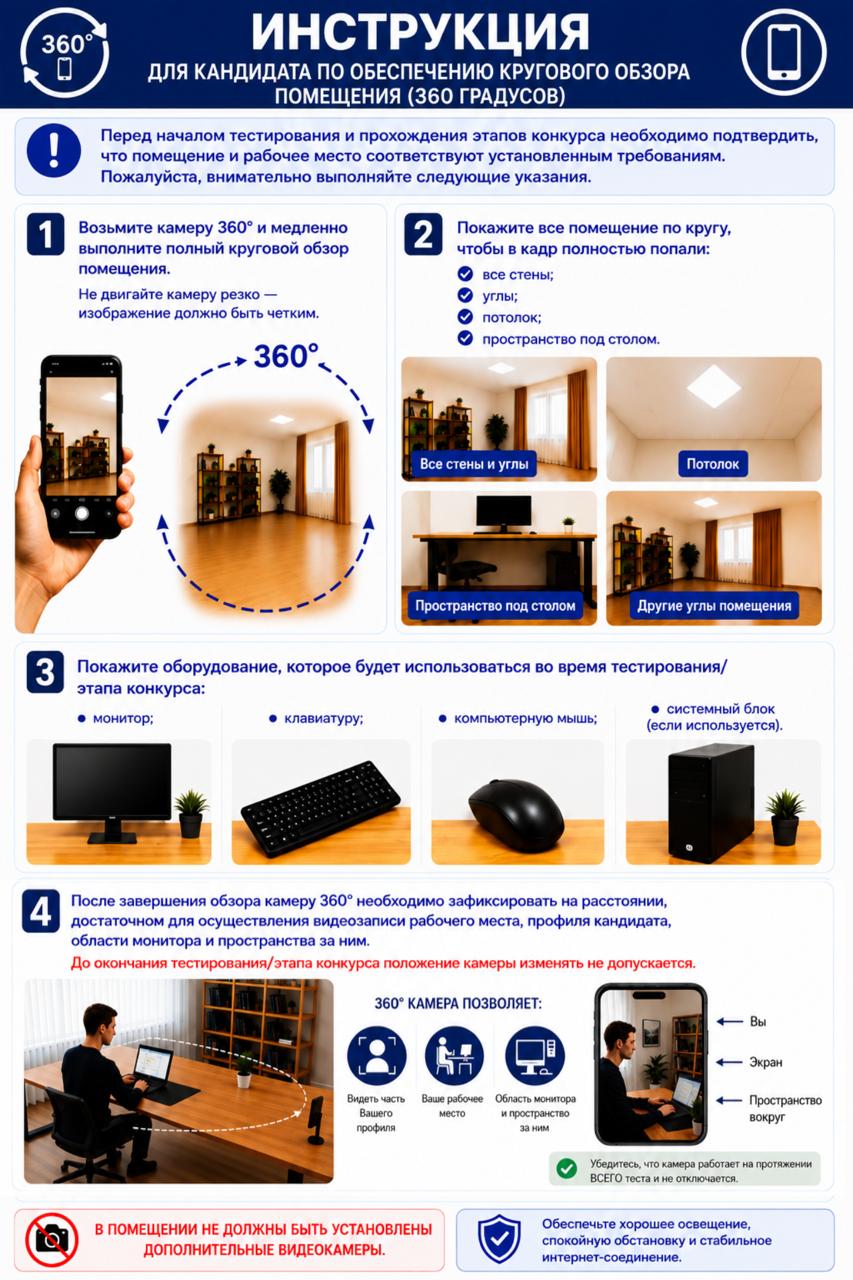
PLEASE NOTE‼️
HOW TO PROPERLY COMPLETE A 360° VIDEO REVIEW?
📌 During the 360° video review, you must show:
— all walls and corners of the room;
— the ceiling and floor;
— the surface of the desk, the area underneath it, and all sides of the desk;
— the monitor, keyboard, and computer mouse;
— the system unit (if available).
✅ After completing the video review, place your smartphone so that the entire workstation is clearly visible.
🔷 The following must be clearly visible in the frame:
— the candidate’s profile;
— the workstation and monitor area;
— the space behind the monitor.
‼️ Attention!
Once the video review has been completed, changing the position of the smartphone is prohibited until the testing or competition stage has been fully completed.
‼️ Prohibited:
— the presence of unauthorized persons;
— the use or placement of additional video cameras.
Source : https://www.gov.kz/memleket/entities/zhetysu-sp/press/news/details/1293783?lang=ru